Figranium allows you to execute custom JavaScript in the browser context at any point in a task. This is the most powerful feature for handling complex logic, data transformation, unsupported interactions, and dynamic content.

The Run JavaScript Block

Add a Run JavaScript action block (internally javascript) to your task.

Execution Context

The code runs directly in the browser page context (via Playwright’s page.evaluate()).
  • Scope: Full access to the global window object.
  • DOM: Full access to document, querySelector, querySelectorAll, etc.
  • Variables: Access runtime variables using {$varName} syntax — they are injected as string literals before evaluation.
  • Async: await is supported. Figranium awaits promise resolution automatically.

Return Values

The return value of your script is captured and stored in block.output, which can be used by subsequent blocks.
Return typeHow it’s stored
StringStored as-is
NumberStored as-is
BooleanStored as-is
ObjectJSON-stringified
ArrayJSON-stringified
PromiseAwaited, then stored
undefinedEmpty string
Access the result in later blocks with {$block.output} or in conditions with block.output.

Examples

Extract Text Content

return document.querySelector(".price").innerText.trim();

Extract Multiple Values

const title = document.querySelector("h1")?.innerText.trim() ?? "";
const price = document.querySelector(".price")?.innerText.trim() ?? "";
const rating = document.querySelector(".stars")?.dataset.rating ?? "0";

return { title, price, rating };

Scroll to Bottom of Page

window.scrollTo(0, document.body.scrollHeight);
return true;

Scroll to Load More Content (Infinite Scroll)

const before = document.querySelectorAll(".item").length;
window.scrollTo(0, document.body.scrollHeight);
await new Promise(resolve => setTimeout(resolve, 2000));
const after = document.querySelectorAll(".item").length;
return after > before; // returns true if new items loaded

Click an Element That Doesn’t Respond to Standard Click

Some sites use custom event handlers. Dispatch a native event:
const btn = document.querySelector(".custom-button");
btn.dispatchEvent(new MouseEvent("click", { bubbles: true }));
return true;

Manipulate Local Storage

const token = localStorage.getItem("auth_token");
return token;

Using Variables

Variables are injected as string literals before evaluation. Use them in expressions:
const query = "{$searchQuery}";
const category = "{$category}";
const url = `https://api.example.com/search?q=${encodeURIComponent(query)}&cat=${category}`;
return url;

Fetch Data from an API Inside the Page Context

Since the script runs in the browser, you can make fetch calls to APIs that the page has access to (bypassing CORS since you’re inside the same origin):
const response = await fetch("/api/user/profile", {
  headers: { "Accept": "application/json" }
});
const data = await response.json();
return data.username;

Extract a Table as JSON

const rows = Array.from(document.querySelectorAll("table tbody tr"));
return rows.map(row => {
  const cells = Array.from(row.querySelectorAll("td"));
  return {
    name: cells[0]?.innerText.trim(),
    value: cells[1]?.innerText.trim(),
    status: cells[2]?.innerText.trim(),
  };
});

Wait for an Element with a Custom Timeout

The javascript block runs synchronously by default. You can add custom polling logic:
const maxWait = 10000; // 10 seconds
const interval = 200;
let elapsed = 0;

while (elapsed < maxWait) {
  if (document.querySelector(".loaded-content")) return true;
  await new Promise(r => setTimeout(r, interval));
  elapsed += interval;
}
return false;

Chaining JavaScript Blocks

Use block.output to pass data between JavaScript blocks:
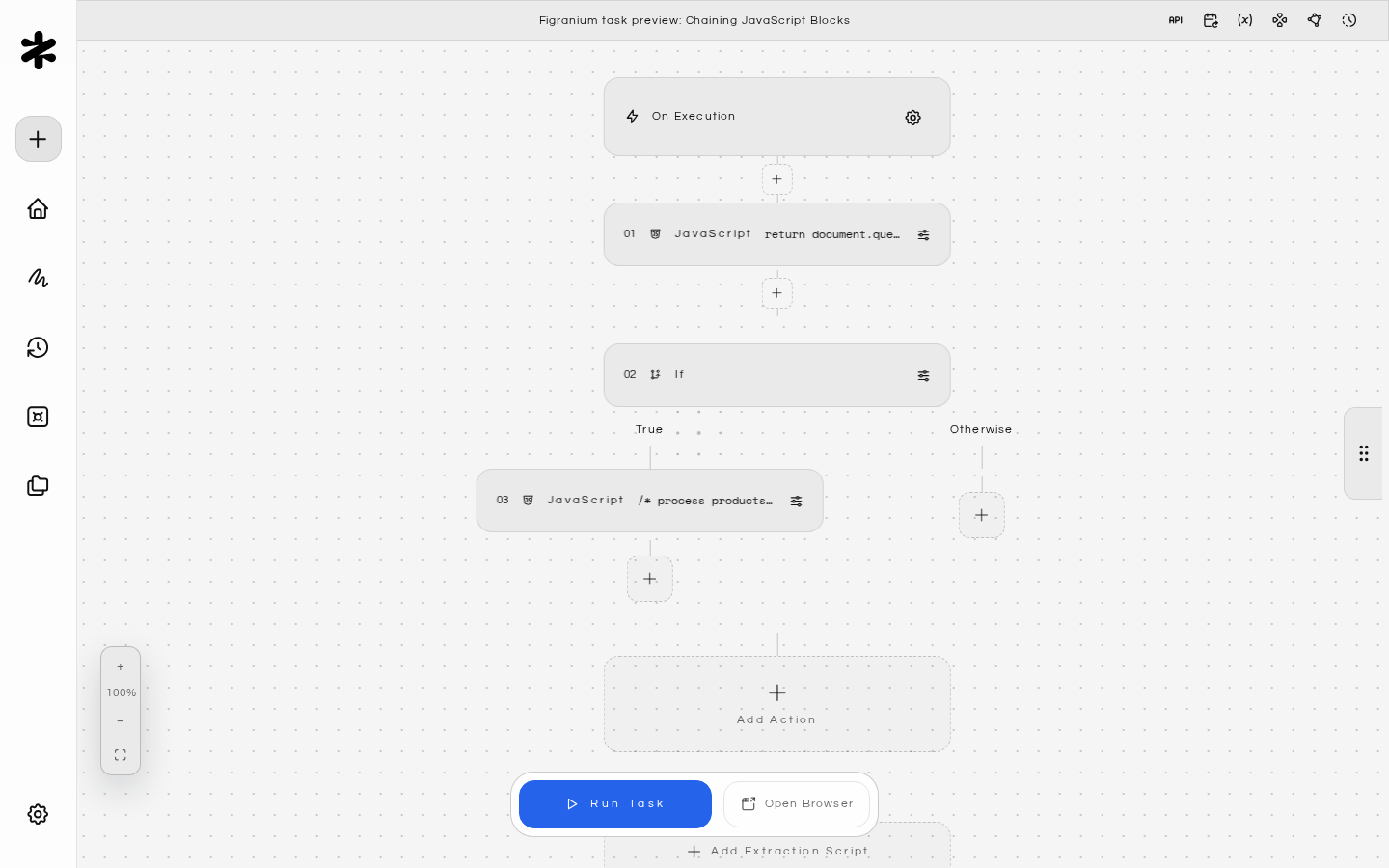
[
  {
    "type": "javascript",
    "value": "return document.querySelectorAll('.product').length"
  },
  {
    "type": "if",
    "value": "block.output > 0"
  },
    {
      "type": "javascript",
      "value": "/* process products */ return Array.from(document.querySelectorAll('.product')).map(p => p.innerText)"
    },
  { "type": "end" }
]

Extraction Scripts vs. JavaScript Action Blocks

Figranium has two places where you can run JavaScript:
JavaScript Action BlockExtraction Script
When it runsAt a specific step in the task flowAfter all actions complete
Outputblock.outputTask’s result.data
Use caseMid-flow logic, intermediate dataFinal data extraction
DOM accessFullFull
For final data collection, prefer the Extraction Script field in task settings. Use JavaScript action blocks for mid-flow decisions and interactions.

Security Considerations

  • Scripts run with the same privileges as the target page.
  • Variables injected via {$varName} are literal string substitutions — avoid injecting user-controlled data into scripts directly to prevent unintended code execution.
  • The JavaScript action block runs in the browser context, not in Node.js. You cannot access the file system or Node.js APIs from within these blocks.
  • For complex data processing that needs Node.js features, use the Extraction Script which runs through Figranium’s sandboxed JSDOM environment. The sandbox is hardened against prototype-chain escape techniques, so extraction scripts cannot break out to access the host Node.js runtime.